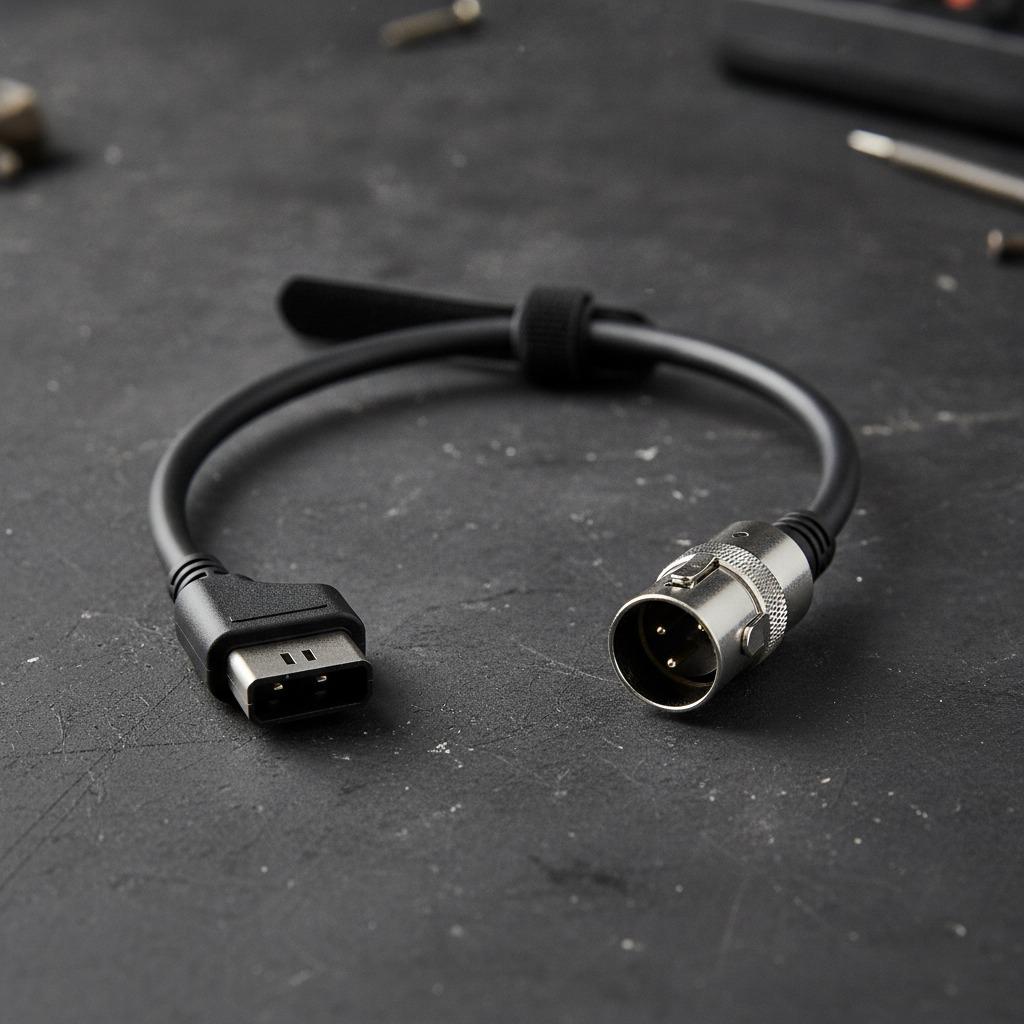
Why a D-tap to XLR 3 pin female cable shows up in real-world setups
A D-tap to XLR 3 pin female cable sounds like a small accessory, but in a working cart, a stage bag, or a field kit, it can be the difference between a clean run and a messy workaround. Engineers, sourcing managers, and product teams usually look at this kind of cable when they need to move power or a compatible signal path between devices without building a custom harness from scratch. The appeal is obvious: fewer adapters, less clutter, and one cable assembly that fits a very specific job.
The search intent behind this topic is usually practical. People want to know whether a D-tap power to XLR 3 pin female cable is the right interface for their equipment, what to watch for before buying, and whether the physical build will hold up under repeated use. That matters because connector shape alone does not guarantee compatibility. A cable can look correct and still be the wrong choice if the device side expects a different pinout, voltage, shielding arrangement, or use case. That is the sort of mistake that costs time on set or in the field, and sometimes damages gear.
What this cable assembly is, in plain terms
From the product details provided, this is a cable assembly with a compact right-angle connector on one end and a circular female connector on the other. The outer jacket is black, flexible, and fitted with molded strain reliefs. The right-angle design helps in tight spaces, especially when the source side sits close to a wall, battery plate, or crowded rig. The circular end uses a locking-style metal shell, which is the kind of feature buyers often want when a connection should stay put during movement.
There is also a sewn hook-and-loop cable tie attached to the cable, which sounds minor until you are packing a flight case at midnight. Small handling details like that do not change electrical performance, but they do affect how the cable lives in the real world.
Because the exact connector standards, pin count on the circular end, wire gauge, cable length, and electrical rating are not supplied, it is safer to treat this as a custom-style interconnect rather than assume universal compatibility.
Where a cable like this fits in a buying decision
For many buyers, the choice is not simply “do I need a cable?” It is “do I need a cable assembly that saves setup time and reduces strain on the connection points?” That is a more useful question.
A D-tap to XLR 3 pin female cable can be attractive when:
- the source side is a compact power outlet or adapter interface and space is limited
- the destination side benefits from a locking circular connector
- the workflow involves frequent transport, coiling, and re-rigging
- the team prefers one molded assembly over a chain of adapters
The right-angle plug matters here. Straight connectors are fine on a bench, but on a rig they can jut out at awkward angles and take side loads. Side loads are where connectors begin to loosen, housings crack, or the jacket starts to fatigue. A right-angle plug reduces that exposure, though it does not eliminate the need for sensible cable routing.
Key features buyers can actually evaluate
1. Connector geometry
The visible geometry is one of the strongest clues to how a cable will perform in service. The short right-angle end suggests a design meant for constrained spaces. The circular female end with a locking-style shell suggests more secure retention than a loose push-fit connector.
2. Strain relief and jacket flexibility
The product description points to molded strain reliefs and a flexible insulated cable. That combination is often worth paying attention to, because the failure point on many cables is not the conductor itself but the transition where the cable enters the connector housing. A good strain relief spreads bending force over a longer area and helps the jacket survive repeated use.
3. Cable management
The attached hook-and-loop strap is a modest but practical addition. It helps with bundling in kits and reduces the temptation to wrap the cable too tightly. That sounds trivial, yet overly tight storage is a common reason cables develop memory or kinks.
4. Custom assembly potential
The company information suggests Alvin’s Cables also supports customized solutions for specialized workflows, including cable lengths and functional designs. For sourcing teams, that matters. In many B2B builds, the off-the-shelf version is only the starting point. The real value comes when the assembly is adapted to the routing, mounting points, and connector constraints of the system.
What to check before you spec or order
This is where a careful buyer slows down. A cable with the right connector family is not automatically the right cable for the application.
First, confirm the actual interface on both ends of your equipment. “XLR 3 pin female” is descriptive, but the mating device and the pinout still need verification. Second, check whether your application is carrying power, signal, or something else entirely. The product information here does not confirm current, voltage, or shielding, so those details should be treated as unknown until documented by the supplier.
Third, look at mechanical fit. If the cable will run through tight bays, around cages, or near moving parts, the right-angle end can be helpful. If the cable will sit in a static position, the advantage may be smaller, and a different geometry could be easier to service.
Fourth, ask how the assembly is built. The provided company information mentions rigorous quality control, including 137 quality checks, gold-plated contacts rated for over 10,000 cycles, and materials intended to endure 25,000+ bends without failure. Those are strong claims from the supplier side, and they may be useful as a purchasing signal, but buyers should still tie any spec decision to the exact cable variant they are evaluating.
Common mistakes with D-tap and XLR-style cables
The first mistake is assuming all cables with familiar connector names are interchangeable. They are not. The second is buying on connector shape alone and ignoring cable routing. If a right-angle plug solves one problem but forces a hard bend at the next fixture, the overall result is worse.
Another common issue is storage. A cable with a flexible jacket can still be abused if it is wound too tightly or left under tension in a gear bag. The cable tie helps, but discipline matters more than accessories.
A final warning: if the application is mission-critical, do not leave pinout or device compatibility to memory. That is the sort of detail people think they know until a field replacement arrives and the connector fits but the system does not behave as expected.
How to compare options without overcomplicating it
For most sourcing or product teams, the comparison should be built around five points: connector fit, mechanical clearance, retention, cable flexibility, and supplier consistency. That is usually enough to narrow the field.
If you are comparing a D-tap to XLR 3 pin female cable against a different cable assembly, ask which one will be easier to route, easier to secure, and easier to replace under pressure. A rugged cable is useful, but a cable that saves ten minutes on every build can be just as valuable. In production environments, small time savings add up fast.
For teams buying in volume, consistency often matters more than any single feature. A cable that looks fine in one lot and slightly different in the next creates headaches in kitting, labeling, and field support. That is one reason many industrial and broadcast buyers pay attention to build repeatability as much as electrical spec.
Practical buyer advice for engineering and sourcing teams
If you are evaluating this cable for procurement, start with a short checklist.
Verify the mating connectors on the actual equipment, not just in a catalog description. Confirm the intended function: power, audio, or interconnect use. Decide whether the right-angle form helps your installation or just adds another constraint. Ask for the missing technical data if your application depends on it, including cable length, conductor details, shielding, and electrical rating.
If you are building a system or product line, consider whether a custom cable assembly would reduce assembly labor or field failures. Alvin’s Cables positions itself as a specialist in high-performance cables and connectors for photography, film, broadcast, and industrial use, and it highlights custom solutions for specialized workflows. That does not replace engineering review, but it does suggest a supplier model suited to nonstandard needs.
FAQ
Is a D-tap to XLR 3 pin female cable always for audio?
Not necessarily. The connector names point to the form factor, but the actual use depends on the device and wiring. Treat the function as application-specific unless the supplier confirms it.
Why choose a right-angle connector?
Usually for clearance. It can reduce protrusion and side load in tight spaces, especially on rigs or crowded panels.
Can I assume the cable is suitable for every XLR-based device?
No. Compatibility depends on the exact connector standard, pinout, and electrical requirements. Those are not fully specified here.
What is the biggest purchase risk?
Buying on connector name alone. The physical fit may be right while the electrical or functional match is wrong.
A sensible next step
If you are sourcing a D-tap to XLR 3 pin female cable for a working system, start by matching the device interface and the cable’s mechanical layout to your real installation, not just the brochure image. If the routing is tight, the right-angle end and molded strain relief are useful advantages. If your project needs a specific length, pinout, or cable behavior, ask for a custom build or a full technical sheet before you commit.
That extra step is not bureaucracy. It is how you avoid buying a cable that fits in the hand but fails the job.